HRStuff can be used by companies worldwide, and includes public holidays for almost
200 countries. You can configure your own payroll rules, leave and claims
settings. Every feature shown here is included for every company, at the same price.
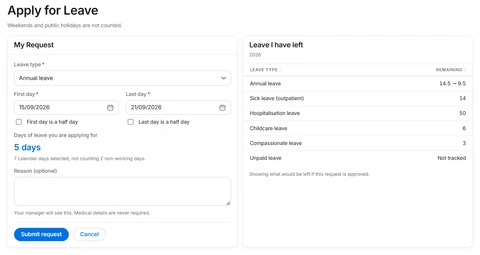
What a member of staff sees. The balance updates as they choose the days, reducing routine questions for HR.
Custom leave types
Annual leave, sick leave, compassionate leave or any other type your company uses. Set its allowance, approval requirement and half-day rule, choose whether it keeps a balance, and disable it later without losing past requests.
Public holidays for almost 200 countries
Choose a country and HRStuff adds its public holidays automatically. Administrators can edit the dates or add company-specific holidays. Leave will be counted automatically taking the holidays and non-working days into account.
Team and company calendars
HRStuff has in-app calendars that gives you an overview of your employees' leave. You can also connect them to Google Calendar or other calendar apps with an iCal link.
Automatic and manual approvals
Leave requests go to the person’s manager. Short leaves can be automatically approved up to a limit you set.
Expense claims
Expense claims, from receipt to payment.
1
SubmitReceipt attached
S$48.20→2
ApproveManager decision
Pending→3
PayRecorded separately
Paid
Sales tax can be included and customized
If your company is registered for VAT, GST or another sales tax, set its name and rate in HRStuff. Exports include both taxed and untaxed amounts, making the figures easier to account for.
Approving and paying are separate
Approving a claim confirms that it can be reimbursed. Marking it as paid is a separate action, and HRStuff records who did it and when. Payments are never marked automatically.
Set when claims are approved automatically
Automatically approve claims below a limit, all claims, or claims submitted by selected employees.
Import past claims easily with a spreadsheet
Use an Excel sheet or CSV and import your company's claims history easily into our website. With our column mapper system, you can be sure that all the data goes where they should.
Payslips
Draft it, check it, publish it.
Use our Payroll Builder to build rules and actions that can apply deductions or additions automatically. Or, setup a custom payslip template for each employee that can be used through the year. A payslip moves through three stages and employees see only published payslips, so you can correct each month as often as needed before publishing.
Recurring pay is added to every draft
Each draft starts with the employee’s basic salary and any recurring additions or deductions, based on their standard payslip which you setup. This happens whether the draft is created manually or on a schedule.
Add one-off payments and deductions
Add a bonus, repayment or other one-time item directly to a payslip. It applies only to that payslip unless someone adds it again later.
Employer costs are shown separately
Employer costs appear separately and never reduce the employee’s pay. Employees can see both their take-home pay and the additional costs paid by the company.
Over 80 countries supported
HRStuff supports companies in more than 80 countries, with our payroll builder, country-aware currencies, and number formats. You can configure the payroll rules that apply to your company and country.
Payroll Builder
Every payroll figure comes from a rule you wrote.
Configure and automate drafting payslips with our Payroll Builder, and the Rules and Actions you set. Our flexible but powerful payroll engine can handle payroll for over 80 different countries, along with each country's unique requirements.
In our Rules and Actions system, each rule set has two parts: conditions that decide who it applies to, and an action that calculates and applies an amount to each employee. No code, no formulas. The rule reads as an ordinary sentence, and HRStuff uses it to process payroll.
Rule sets are processed from top to bottom. Below is an example that shows a social security scheme written as 3 rule sets, and the resulting calculation for one employee.
⌘
Social security3 rule sets, processed from the top
From 1 Jan 2026
Rule Set 1
When Residency is Foreign worker: do nothing.
Rule Set 2
When Age is at most 55: deduct 8% of basic salary from the employee, and add an employer contribution of 12%.
Rule Set 3
For everyone else: deduct 5% of basic salary from the employee, and deduct 7% of basic salary from the employer.
How it was worked out: Ana Reyes, 31
Rule set that matched
Rule Set 2
Calculated from
$5,450.00
Total, 20% → nearest dollar
$1,090.00
Employee 8%, rounded down
$436.00
Employer, the balance
$654.00
Where the rules are written. Each rule reads as a sentence, and the sentence is how payroll is processed.
Rule Set 1 does nothing on purpose. Because the first rule set that matches stops the search, a rule set at the top that does nothing is how an exemption gets written. Everybody it catches never reaches the rule sets below. Rule Set 3 is the catch-all, which is how otherwise gets written. The order you put them in is the whole design.
Filter using details you already record
Filter employees with rules and conditions based on: employment type, age, years or months of service, job title, country, nationality, residency status, marital status, basic salary, additional pay and more.
Define the actions applied
For employees the rules filtered, choose an action and what it applies to. Choose an addition or deduction applied to those employees' basic salary, gross pay, net pay, or additional pay such as overtime, allowances and bonuses, and more.
AND, OR, and groups inside groups
Combine conditions with AND and OR operators. Group these conditions into a rule and group multiple rules to create a rule set. This means “full time, and either over 55 or in Singapore” is one rule rather than three.
A percentage, or a fixed amount
An action can calculate a fixed amount or percentage as an employee payment, employee deduction or employer contribution. One rule can apply several actions at once.
Shown working, every step
Every payslip amount shows the rule that produced it, the pay it was calculated from, any limit applied and the rounding used. If a figure is wrong, fix the rule instead of typing over the result.
Custom employee tags
For statutory or company policies that our standard payroll rules don't cover, you can create custom tags such as Military Relief or Hazard Pay Eligible, and assign them to employees. Rules can then match people who have those tags, and apply actions accordingly.
Thresholds and ceilings
Apply a percentage only to pay above a threshold, or set a monthly or annual ceiling. For a levy starting at $30,000, the first $30,000 stays untouched. Near a ceiling, HRStuff applies only the amount still due and rounds without going over it.
And on the year so far
A rule can check gross pay year to date, how much a payroll line item has already deducted this year, and more, before deciding what to do next.
Connected work
Keep HR work visible in the tools your team already uses.
Connect HRStuff to Google Calendar, Slack, Microsoft Teams, Telegram, Make and Zapier. Company calendars stay updated automatically, channel updates can be grouped into quiet summaries, and selected HR events can be sent immediately to your automations.
Google Calendar
Subscribe to a read-only Company Calendar. Approved leave and public holidays update automatically. The same private calendar link also works with Microsoft Outlook and Apple Calendar.
Slack
Choose which HRStuff events go to a shared Slack channel, the relevant person as a personal message, or both. Send them immediately, in a 15-minute summary or daily, with links back to the records that need attention.
Microsoft Teams
Connect a shared channel through Microsoft Teams Workflows. Choose which HRStuff events to send and receive them immediately, in a 15-minute summary or daily. HRStuff can post to the workflow but cannot browse Microsoft 365 or read its messages.
Telegram
Employees can connect their own Telegram account for personal notifications, while HR can send company updates to a private chat, group or channel. No Chat ID or bot token is needed. Choose immediate, 15-minute or daily delivery.
Make
Install the HRStuff Make app and use Watch HRStuff Event to start a scenario from the events you choose. If you prefer, connect a custom webhook instead. Both routes allow you to create custom automations with HRStuff notification events.
Zapier
Connect the private HRStuff Zapier app and use New HRStuff Event to start a Zap from the events you choose. If you prefer, connect a Catch Hook instead. Both routes allow you to create custom automations with HRStuff notification events.
Sensitive details stay in HRStuff. Notifications do not include claim amounts, leave reasons, attachments or payslip contents.
Company insights
Company insights that highlight potential problems
View live insights on employees, payroll, leave and claims, together with items that need attention. Open detailed reports for headcount, leave balances and liability, payroll movements, department costs, and claims info.
One overview across the company
See current headcount, gross payroll, approved leave and claims in one place, with payroll trends and a list of what needs attention.
Open, filter and export
Narrow each report by its relevant dates, department, people or status. Export those results as CSV, or save them as PDF.
Job title, department, who they report to, employment type, start and end dates, date of birth, residency, nationality and country, salary, bank details, address and an emergency contact.
Contracts and letters filed on the person
Keep contracts and letters with the employee record, just as receipts stay with claims, instead of relying on a separate shared folder that somebody has to organize.
Import employees from a spreadsheet
Before importing, HRStuff shows which employees will be added, which records will be updated and which rows need attention. Use the column mapper to match your spreadsheet fields to HRStuff before saving anything.
And export it too
Export employee records to a spreadsheet whenever you need them, so your data is never locked in.
Made yours
The settings that make it your own software.
Customize it to suit you
Each company can set the currency it works in, date format, time zone, number format, whether European or American British, and more. Every page and feature follows your settings.
Your working week
Whether your working week is Monday to Friday, Monday to Saturday, or something else, HRStuff calculates the total amount of leave used automatically.
Your leave year and your payroll year
Choose the starting month for your leave year and payroll year. You can also choose the day each month when payslip drafts are created and another day for publishing, or leave either step unscheduled.
Your own words for leave types and more
Name leave types and residency categories using the terms your company uses. This lets payroll rules reflect your local classifications without forcing another country’s terminology.
Underneath
The parts you only notice when something fails.
An activity log that only grows
Sensitive actions are written to a log that is added to and never edited, so what happened stays what happened.
People are told when something changes
Employees receive an in-app notification when leave is approved or rejected, a claim is decided or paid, or a payslip is published.
Email two-factor authentication
Switch it on company-wide so every administrator, manager and employee enters a six-digit emailed code after their password.
Recover one company without rewinding everyone
HRStuff creates encrypted backups for each company. Every backup can be verified, rebuilt and restored without rolling every other company back.
The right decimal places for every currency
HRStuff uses the precision each currency actually has: no decimal places for currencies such as the Japanese yen, two for most currencies and three for currencies such as the Kuwaiti dinar. Amounts are stored, calculated and shown without inventing or losing fractional units.
Run a month of your own payroll today.
Create your company, bring your staff list in from a spreadsheet, and check a month against your real figures. Reading about it is slower than trying it.