
Understand the leave owed in money report
See the estimated cost of unused leave marked Encashable and find records that need attention.
What this guide helps you do
Leave owed in money estimates the cost of unused leave types marked Encashable. Use it for planning only; it does not tell you what must be paid under local law or an employee’s contract.
Open ADMINISTRATION, Reports, then Leave owed in money. The company must have both Leave and Payroll features because the report combines a leave balance with basic salary.
What is included
Only leave types that track a balance and are marked Encashable in Leave Settings are included.
The employee must have been employed for at least part of the selected leave year.
Entitlement, brought-forward days and adjustments contribute to the available balance. Approved leave already taken reduces it.
Pending requests do not reduce the estimated liability because they are still awaiting a decision.
The Employment status filter defaults to Active. Choose All to include relevant people who have left when reviewing a historical year.
A leave type that is no longer offered can still appear when its historical balance or usage matters.
How HRStuff estimates one day
HRStuff reads the person’s monthly basic salary as it stood on the last day of the selected leave year. It multiplies that salary by 12, then divides it by 52 weeks and by the number of working days in the company work week.
HRStuff first rounds the daily rate to the currency’s smallest unit, such as one cent. It then multiplies that rate by the unused Encashable leave days. This makes each row easy to check with a calculator.
Example structure: monthly basic salary × 12 ÷ 52 ÷ working days per week.
A person who joined during the leave year has their annual entitlement prorated by the calendar days remaining and rounded to the nearest half day.
Changing the working week, salary history, entitlement or encashable setting changes the inputs. Review those source records rather than overriding the report total.
Read each row
Each row shows the employee, department, leave type, unused days, estimated daily value and estimated amount owed. The summary shows what share of the unused days HRStuff could value. The chart groups the valued amounts by department.
No salary on file means the leave days are shown but not valued. That row is excluded from the money total.
Taken beyond allowance is shown separately as Not owed. A negative balance never reduces what the company owes another employee.
Not valued is different from zero. It means HRStuff lacks the salary needed to produce an honest estimate.
If the included salary records use more than one currency, HRStuff refuses to produce one combined total rather than adding unlike amounts.
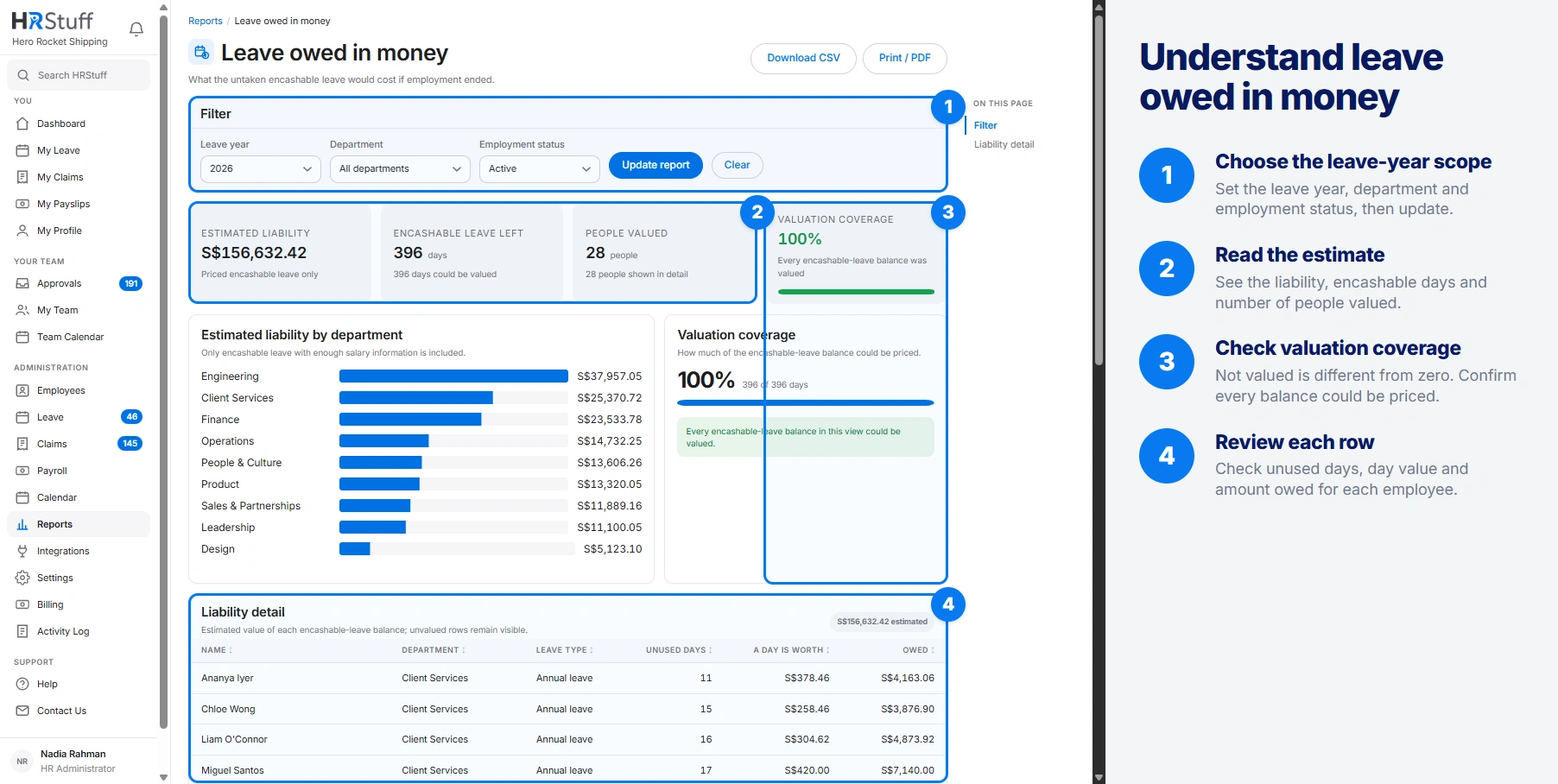
Use the filters
Choose the Leave year
The year follows the company’s leave-year start month, not necessarily January to December.
Narrow by Department if needed
Leave it blank for the whole allowed company scope.
Choose Employment status
Choose Active to estimate unused leave for current employees only. Choose All when checking a past year or the final entitlement of someone who has left.
Update the report
Read the report note after every change; it names the year-end salary date and working-week formula used.
Resolve records that need attention
For No salary on file, open the employee record and check the basic-salary history for the last day of the leave year.
For an unexpected balance, check the leave type, personal entitlement, brought-forward days, adjustments and approved leave in that year.
For an unexpected person, check their start date, last working day and the Employment status filter.
For an unexpected leave type, check whether Tracks balance and Encashable are enabled and whether an inactive historical type still holds a balance.
Export the estimate with its assumptions
Download CSV keeps the selected filters, calculation note, warnings, rows and total. Print / PDF produces the same answer in a clean layout.
Keep the note with the figures when sending them to finance or an adviser. It states that the result is an estimate and names the formula, salary date and exclusions that make the total understandable.