
Choose who approves claims
Send eligible claims to managers while keeping larger or exceptional claims with HR.
What this guide helps you do
Claims Settings controls who receives a pending claim, what amount a manager may decide, what happens while that manager is away and which claims can approve themselves.
Review Who Approves Claims, Approval Delegation and Automatic Claims Approval together. The combined settings determine whether a new claim waits for a manager, waits for HR or goes straight to Approved.
Choose the manual approval route
HR only sends claims to HR administrators for a decision.
Managers first sends a direct report’s claim to their reporting manager when the amount is within the manager limit.
A claim above the manager limit goes to HR.
Leaving the amount blank while Managers first is active means managers may decide claims of any size.
Turning Managers first off remembers its amount limit for later, but the limit has no effect while HR only is selected.
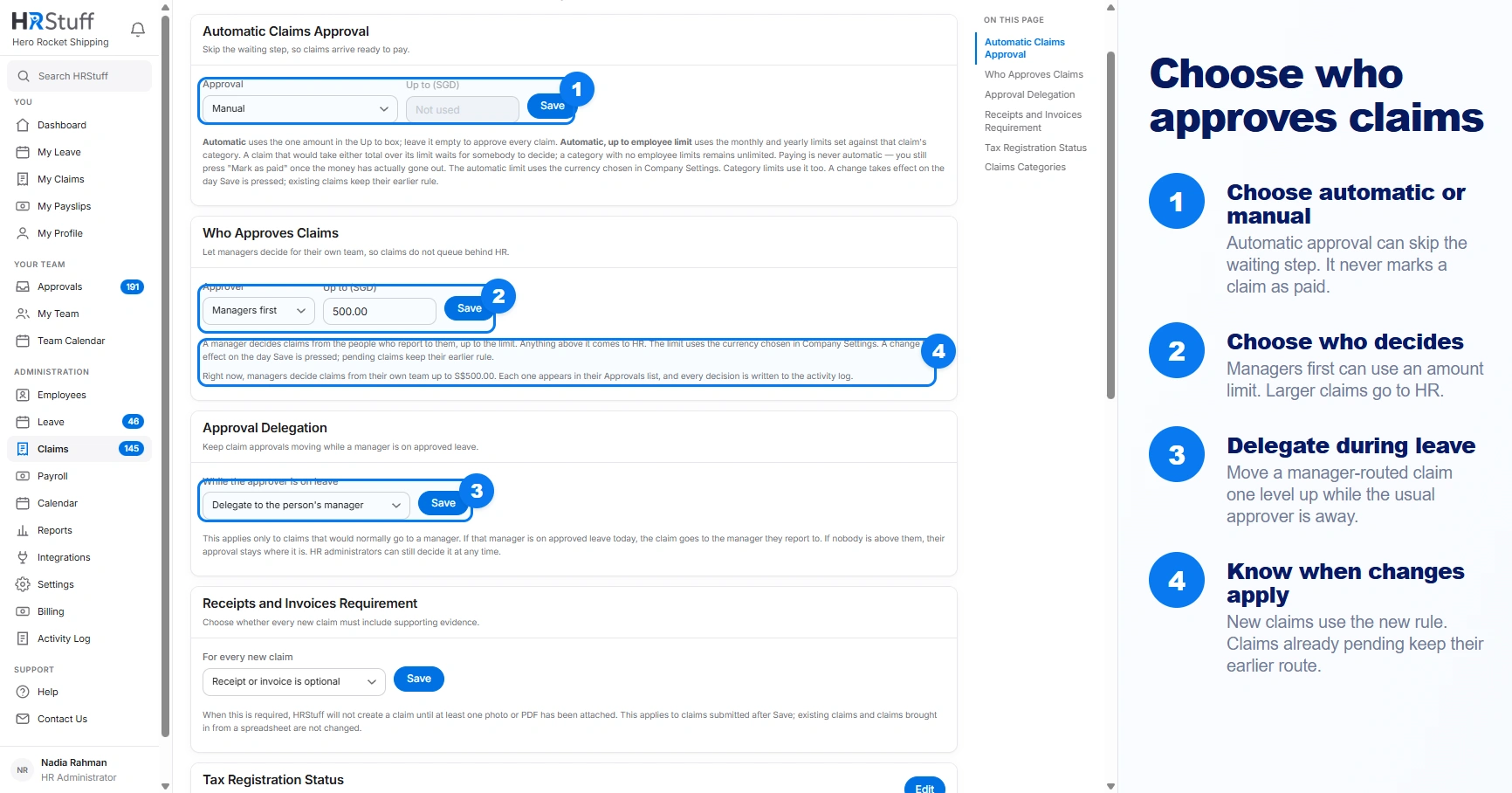
Keep approvals moving while a manager is away
When a manager is on approved leave today, Approval Delegation can send their claim approvals to that manager’s own reporting manager. If that manager has no reporting manager, the approval stays with them. HR administrators can still decide the claim.
Choose an automatic-approval rule
Automatic approval never bypasses required fields, date rules, active-category checks, the maximum claim safeguard or a company-required receipt. It approves the claim; it does not mark it paid.
Manual makes valid claims wait for the manual route.
Automatic with a fixed amount approves claims up to the company amount. A blank amount means no size limit.
Automatic, up to employee limit uses the monthly and yearly employee limits on the chosen category. Going over either sends the claim for a decision.
An individual employee may also be marked for automatic claim approval.
Keep currency changes in mind
Each claim keeps the currency and amount-limit rules that applied when it was submitted. Changing the company currency or those limits later does not rewrite the saved claim. HRStuff does not convert amounts between currencies.
Test the route
Check the employee’s reporting manager
A manager route cannot reach the intended person when the reporting line is wrong.
Submit a small test claim
Choose an amount clearly below or above the configured limit, depending on the route you want to test.
Read the success message
It says whether the claim approved itself, is waiting for the named manager or is waiting for HR.
Open Approvals with the intended role
Confirm the correct person can see it, then reject or cancel the test with a clear note if it should not remain payable.