
Choose who approves leave
Route requests to managers or HR and decide what happens when an approver is away.
What this guide helps you do
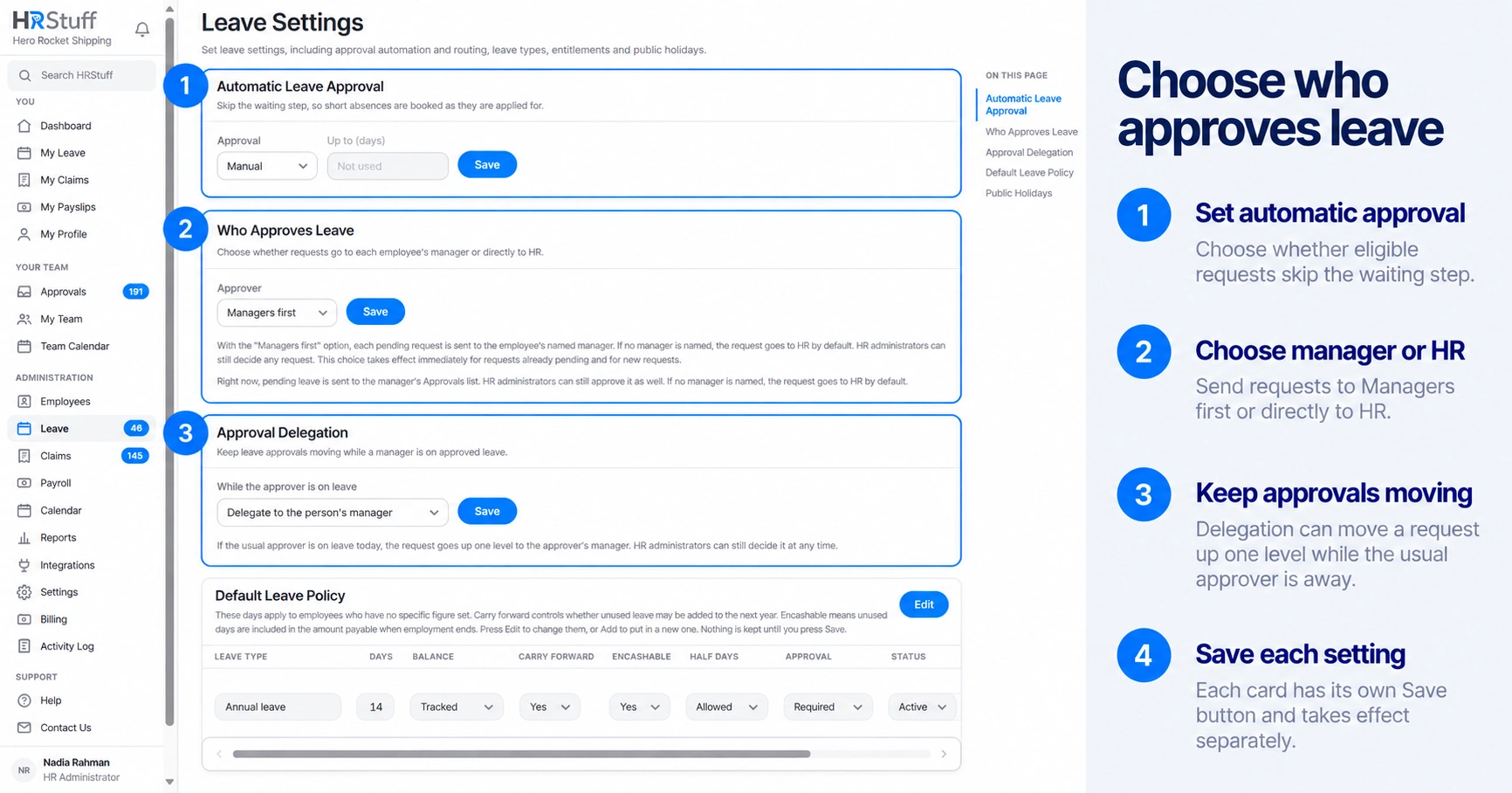
Leave Settings controls three separate questions: who normally decides a request, whether an absent manager’s work moves up one level, and whether eligible requests skip manual approval altogether.
Open ADMINISTRATION, Leave, Leave Settings. Review Who Approves Leave, Approval Delegation and Automatic Leave Approval together so the combined result is intentional.
Choose the normal approver
HR only sends every pending request to HR administrators. Managers do not see those requests in Approvals.
Managers first sends a request to the employee’s named reporting manager. HR administrators can still decide it.
If Managers first is on but the employee has no reporting manager, the request falls back to HR.
Manager approval must be enabled for the company before Managers first can be selected.
Decide what happens while a manager is away
When a manager is on approved leave today, Approval Delegation can send their employees’ leave requests to that manager’s own manager. This moves each decision up one reporting level. It does not give the team permanent access to another manager, and HR can still decide the request at any time.
Off leaves the ordinary routing unchanged.
Delegate to the person’s manager sends the request to the absent approver’s manager.
Keep reporting lines accurate. Delegation cannot find the next approver if that relationship is missing.
Use automatic approval deliberately
Automatic Leave Approval approves requests as they are submitted. You may set a maximum length, such as up to two days, or leave the maximum blank for any length. Balance, overlap, leave-year and date checks still apply; automatic approval changes who reviews the request, not whether the request is valid.
A leave type may also be set to Automatic.
An individual employee may have their own automatic-approval setting.
An automatically approved request is recorded in the Activity Log. It has no approver name because nobody made a manual decision.
Set the company rule to Manual when requests should wait again. This does not turn off Automatic approval for a leave type or an employee’s individual setting.
Test the route before relying on it
Check the employee’s reporting manager
Open the employee record and confirm the named manager is correct.
Submit a small test request
Use a real employee and dates that can safely be cancelled.
Read the success message
HRStuff tells the employee whether the request was approved automatically or is waiting for their manager or HR.
Check Approvals with the intended role
Confirm the request appears for the expected person and remains visible to HR. Cancel the test while it is still pending if it should not become a real booking.