
Create and manage leave types
Set default entitlement, balance tracking, carry-forward, encashment, half days, approval and active status.
What this guide helps you do
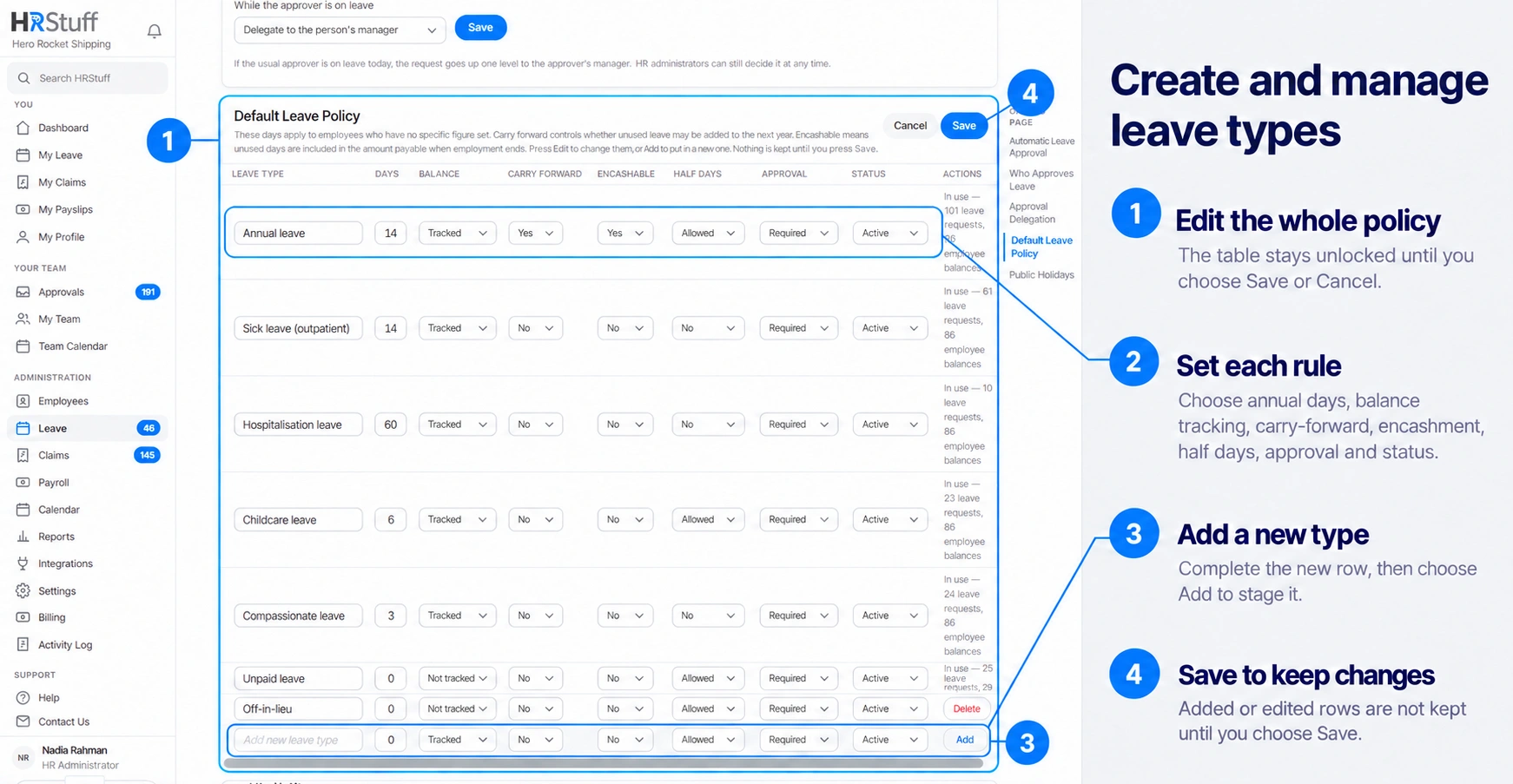
A leave type defines how one kind of absence behaves for the whole company. Open ADMINISTRATION, Leave, Leave Settings, then find Default Leave Policy. The table is locked until you choose Edit; changes and new rows are kept only when you choose Save.
Use a separate type when the allowance, balance behaviour, half-day rule or approval rule is genuinely different. A name alone does not create a new policy.
Understand every setting
Leave Type is the name employees and approvers see. Use a clear policy name such as Annual Leave or Childcare Leave.
Days is the default annual entitlement for employees who have no personal figure set.
Balance: Tracked enforces an allowance and shows a balance. Not tracked records the absence without limiting it to an annual number of days.
Carry Forward allows HR to record days as Brought Forward in a later leave year. HRStuff does not transfer the days automatically. It applies only to a tracked type.
Encashable marks unused days as eligible for the leave-owed-in-money report when employment ends; it does not itself make a payment.
Half days controls whether employees can make the first or last day of a request a half day.
Approval: Required sends the request through the approval route. Automatic approves that type immediately, subject to the ordinary date and balance checks.
Status: Active makes the type available for new requests. Disabled preserves it for history but removes it from the normal application list.
Add a leave type
Choose Edit
This unlocks the table and the Add new leave type row.
Enter the name and annual days
Start with the company-wide default. A negotiated personal figure can be set separately on an employee record.
Choose the policy switches
Decide tracking, carry-forward, encashment, half days, approval and status from the actual company policy.
Choose Add, then Save
Add places the new row in the table. Save applies all changes together.
Change an existing type carefully
Policy changes affect leave years that are still open. Closed leave years keep their stored entitlement figures. Disabling a type stops new requests while preserving its existing requests and historical figures.
Changing the working policy does not convert one leave type into another and does not erase requests. Review personal entitlements and open requests after a material change.
Delete only an unused mistake
Delete is available only when no request, balance or personal entitlement depends on the type. The page names what is in use. Deletion cannot be undone; if the type may be needed for reporting or future reference, disable it instead.