
Decide several leave requests together
Use the approval list safely while keeping any employee-visible notes clear.
What this guide helps you do
Bulk decisions are useful when several straightforward requests are ready at once. They do not remove the need to review each row: every selected request keeps its own employee-visible note and still passes the normal permission, status and balance checks.
Open Approvals. Filter the list first if that helps you work through one team, period or leave type at a time.
Prepare the list
Use View for any request whose reason, half-day detail, balance or team coverage needs closer inspection.
Leave a row unticked when it needs a separate conversation or entitlement correction.
Disabled tick boxes identify rows that are no longer pending or that you are not allowed to decide.
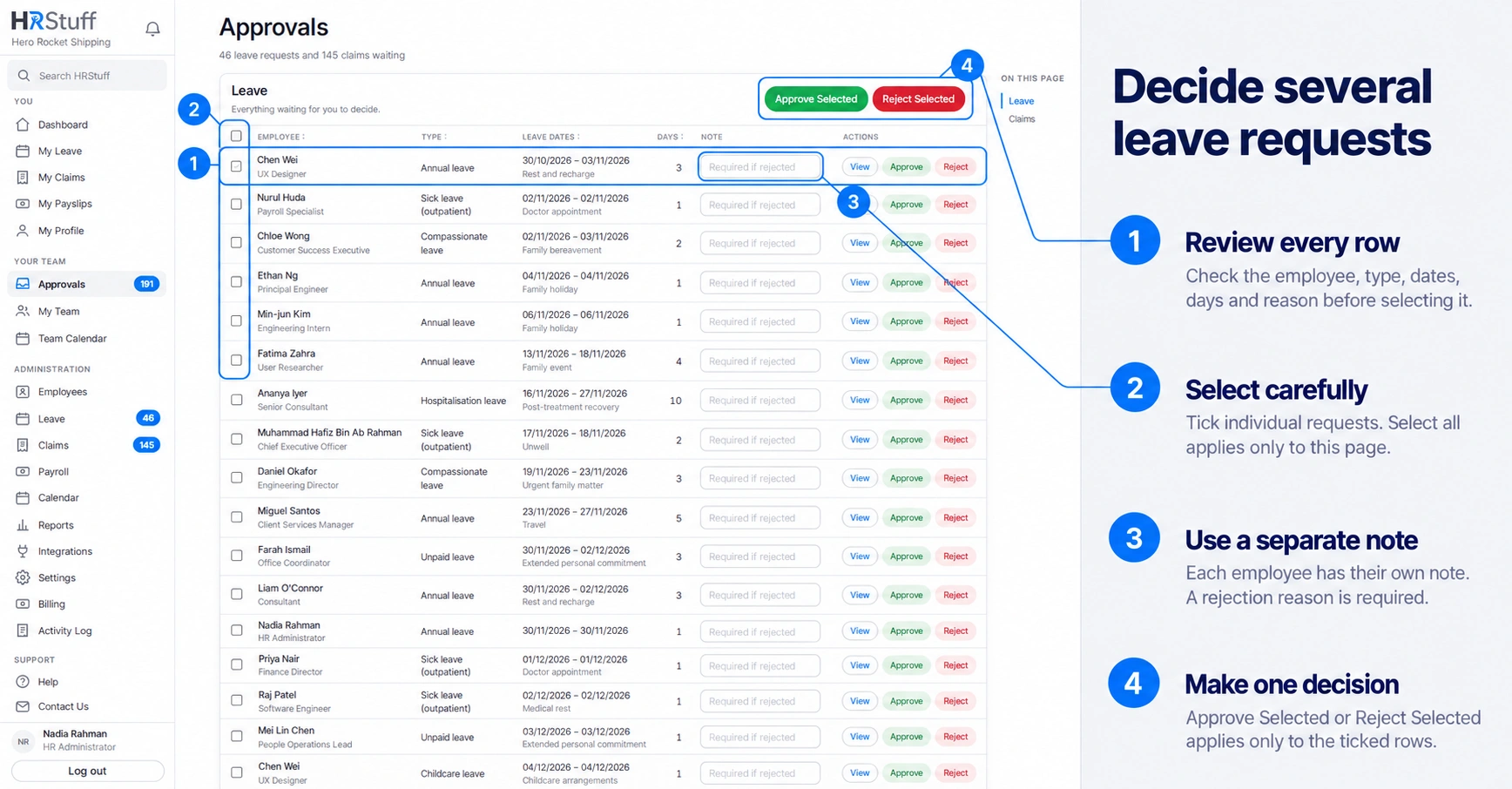
Approve selected requests
Tick only the reviewed rows
Use the individual boxes, or Select all after checking every eligible row on the page.
Add notes only where useful
An approval note is optional and visible to that employee. Each row has its own field.
Choose Approve Selected
HRStuff checks and decides each selected request separately. Successful requests are approved. The result message lists any request that could not be approved, together with the reason, so you can review it separately.
Reject selected requests
Write a reason beside every selected row
Enter the reason for rejection in that employee’s Note field. Each selected request needs its own note; HRStuff does not copy one note across the batch.
Recheck the selection
Make sure a note has not been entered beside one row while a different row is selected.
Choose Reject Selected and confirm
Each rejected employee sees only the note attached to their request. The pending days are released and the decision is recorded.
Use bulk decisions safely
Do not bulk approve simply because the requests are short; check dates and coverage.
Do not put confidential discussion into a note. It becomes part of the employee-visible leave record.
If some selected requests could not be decided, reload or filter the list again before continuing. Do not assume every selected row changed.
Use the single-request page when one decision depends on context that is not visible in the table.