
Recalculate after changing a rule
Apply corrected settings to a draft without rewriting published payslips.
What this guide helps you do
Changing a Payroll Builder rule does not silently rewrite saved payslips. Drafts can be recalculated; published payslips remain fixed until an HR administrator deliberately moves them back to draft.
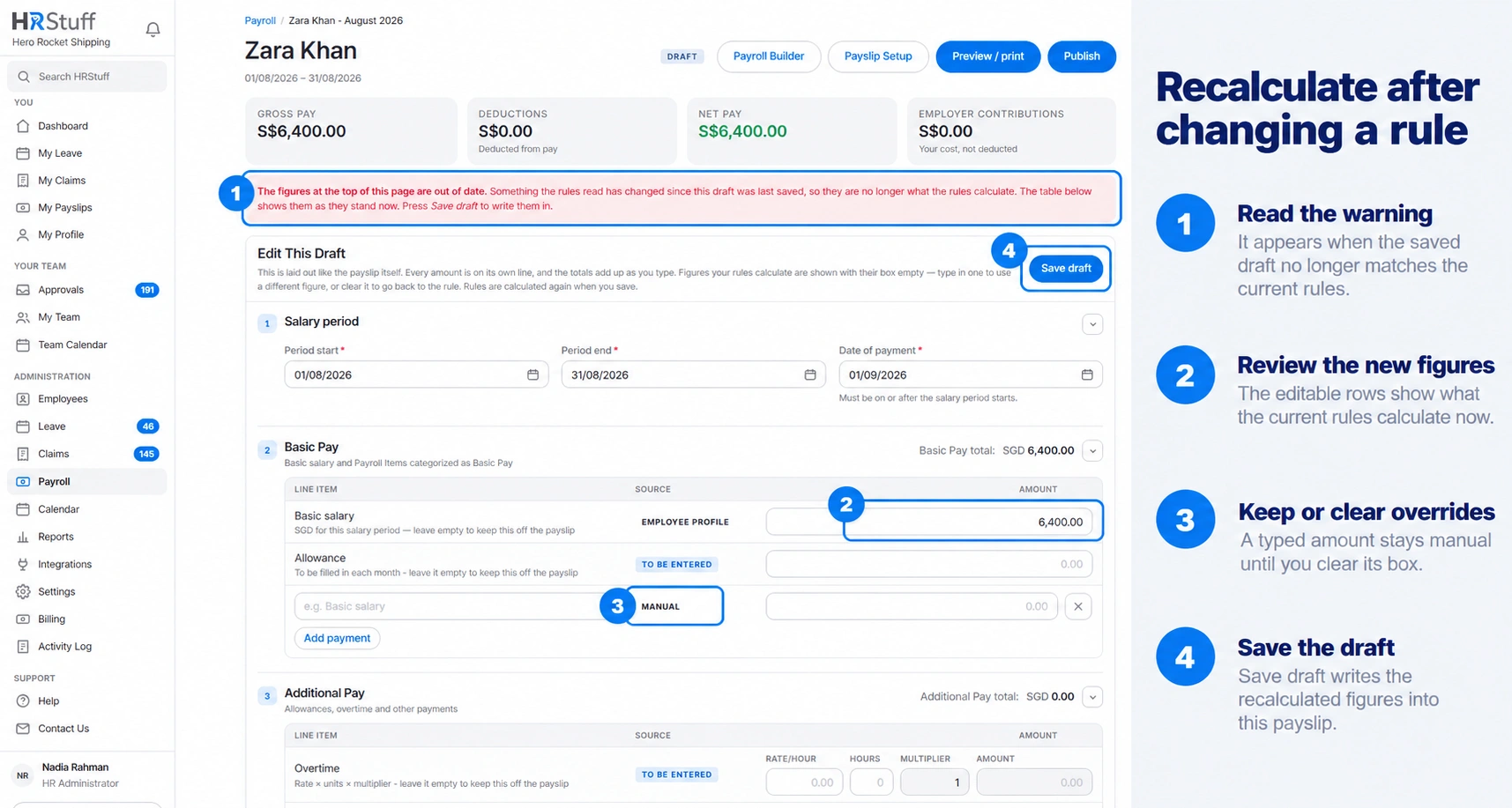
Open the draft and choose Update draft. Updating runs the current rules for that payslip’s dates and writes the new totals. Save draft keeps your edits without changing the calculated figures.
Work out what caused the change
A Rule Set, condition, action, rate, floor, ceiling or rounding choice changed.
The order of Rule Sets or payroll items changed.
A payroll item was activated, paused, removed or given a new effective version.
An employee fact used by a condition changed, such as date of birth, residency, department or start date.
Another payslip was published and changed a year-to-date limit available to this draft.
Check which version should apply
Every draft uses the payroll-item definition currently saved in Payroll Builder. For a dated item, the first day of the salary period must fall within the item’s current date range. To apply the corrected rule to an older draft, change that range to include the older period, then save and review the draft again.
Recalculate a draft
Open the affected draft
From Payroll, filter by salary month, employee and Draft status, then choose Open Payslip.
Read any out-of-date warning
HRStuff compares the saved totals with the current rules. If they differ, the workings show the current result while the tiles still show what was last saved.
Choose Update draft
This recalculates the payslip and stores the new totals. Saved manual overrides remain in place unless you clear their amount boxes. Use Save draft instead when you only want to keep edits for later.
Compare the result
Recheck gross pay, deductions, net pay, employer contributions and every changed line in the workings. Preview the employee document before publishing.
Update several drafts safely
HRStuff does not offer a bulk Update draft action. Open and update each affected draft so you can see the warnings and result for that employee. Use Payroll filters to keep the relevant month and Draft status together.
Do not expect published payslips to move
Published payslips are historical records. Current rule edits, employee corrections and format changes leave them exactly as issued.
If the published figure was correct at the time, leave it alone.
If it was wrong, move the payslip back to draft. The employee loses access while it is corrected.
Update the draft, review the recalculated difference and publish it again. HRStuff records the withdrawal and new publication.