
Set company and individual leave entitlements
Use standard allowances, personal adjustments and negotiated figures without losing history.
What this guide helps you do
HRStuff separates the company’s normal annual allowance from exceptions for one person and corrections for one leave year. Choosing the right place prevents a temporary change from silently becoming permanent.
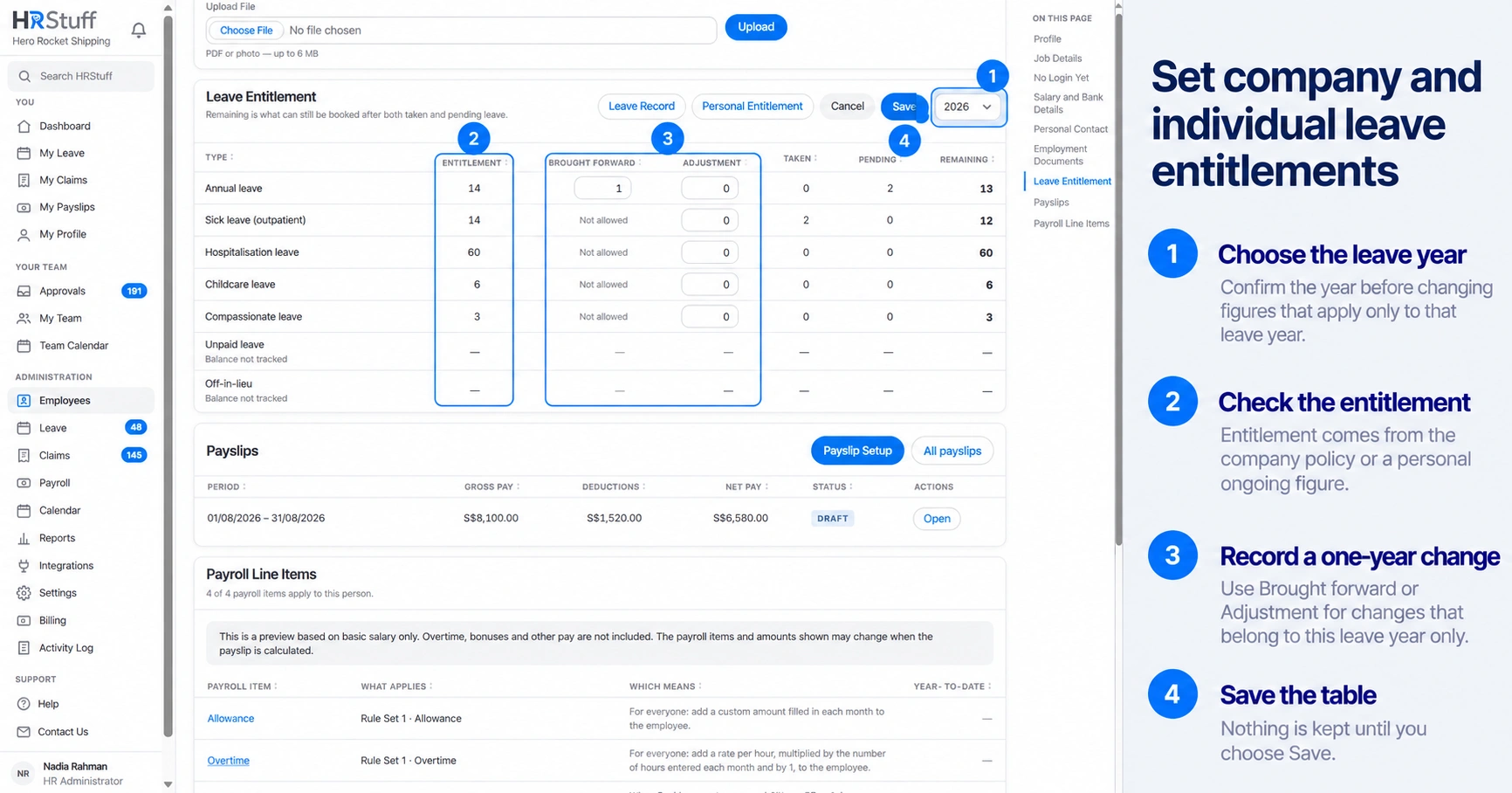
Set the standard allowance in Leave Settings. Set a different ongoing allowance on the employee’s Personal Leave Entitlement page. Use Brought Forward or Adjustment for a change that applies to only one leave year.
Choose the correct kind of change
Company default: use for the ordinary annual allowance that should apply to everyone without an exception.
Personal entitlement: use for an ongoing contractual or working-pattern difference for one employee.
Brought forward: use for unused days carried into this leave year, and only when that leave type allows carry-forward.
Adjustment: use for a one-year correction, award or reduction. Add a note that explains why.
Set the company default
Open Leave Settings
Go to ADMINISTRATION, Leave, Leave Settings and find Default Leave Policy.
Choose Edit
Update Days for the relevant leave type. Check the other policy fields before saving because the table is saved together.
Choose Save
Employees without a personal figure follow the new policy in open leave years. Closed years are not rewritten.
Set an individual entitlement
Open the employee record
Go to ADMINISTRATION, Employees, open the employee, then find the Leave Entitlement card and choose Personal Entitlement.
Choose the leave year and type
Confirm you are editing the intended type. The page shows whether the current figure follows policy or a personal value.
Enter the personal annual figure
Use a personal entitlement only when the employee should have a different allowance in the current and future leave years that remain open. Leave it blank to use the company allowance.
Save and recheck Remaining
HRStuff recalculates Remaining using the allowance that applies to the employee, plus Brought Forward and Adjustment, minus Taken and Pending leave.
Understand joiners and leavers
When someone starts after the leave year begins, HRStuff reduces the annual allowance according to the calendar days remaining and rounds the result to the nearest half day. This applies to both the company allowance and a personal entitlement.
A last working day determines whether the employee is included in a leave year. HRStuff does not automatically reduce their allowance for the year they leave. If company policy requires a reduction, enter an Adjustment instead of changing their ongoing annual entitlement.
Protect historical figures
Closed leave years keep the entitlement stored when the year closed instead of using the current company or personal entitlement.
A disabled leave type keeps the historical entitlement that applied when it was disabled.
Do not delete a type or overwrite a permanent entitlement to solve a one-year discrepancy.
Use the note on a balance adjustment so another administrator can understand the correction later.