
Set up claim categories and limits
Define claim names, receipt requirements and optional employee or company limits.
What this guide helps you do
Claim categories are the choices employees use to describe expenses. Claims Settings also holds optional employee and company spending thresholds and the rule for requiring receipts.
Open ADMINISTRATION, Claims, Claims Settings. Use Claims Categories for names and limits, and Receipts and Invoices for the evidence rule.
Add or rename a category
Choose a clear category name
Use wording employees will recognise, such as Transport, Equipment hire or Client meals. Categories are company-specific.
Add the category
The new choice becomes available on the claim form. Every category follows the same approval route.
Use Edit to correct existing wording
Renaming a category changes the label shown on existing claims. The claims remain in the same category and keep their history.
Remove only an unused category
HRStuff refuses removal while any claim uses the category and tells you how many records depend on it.
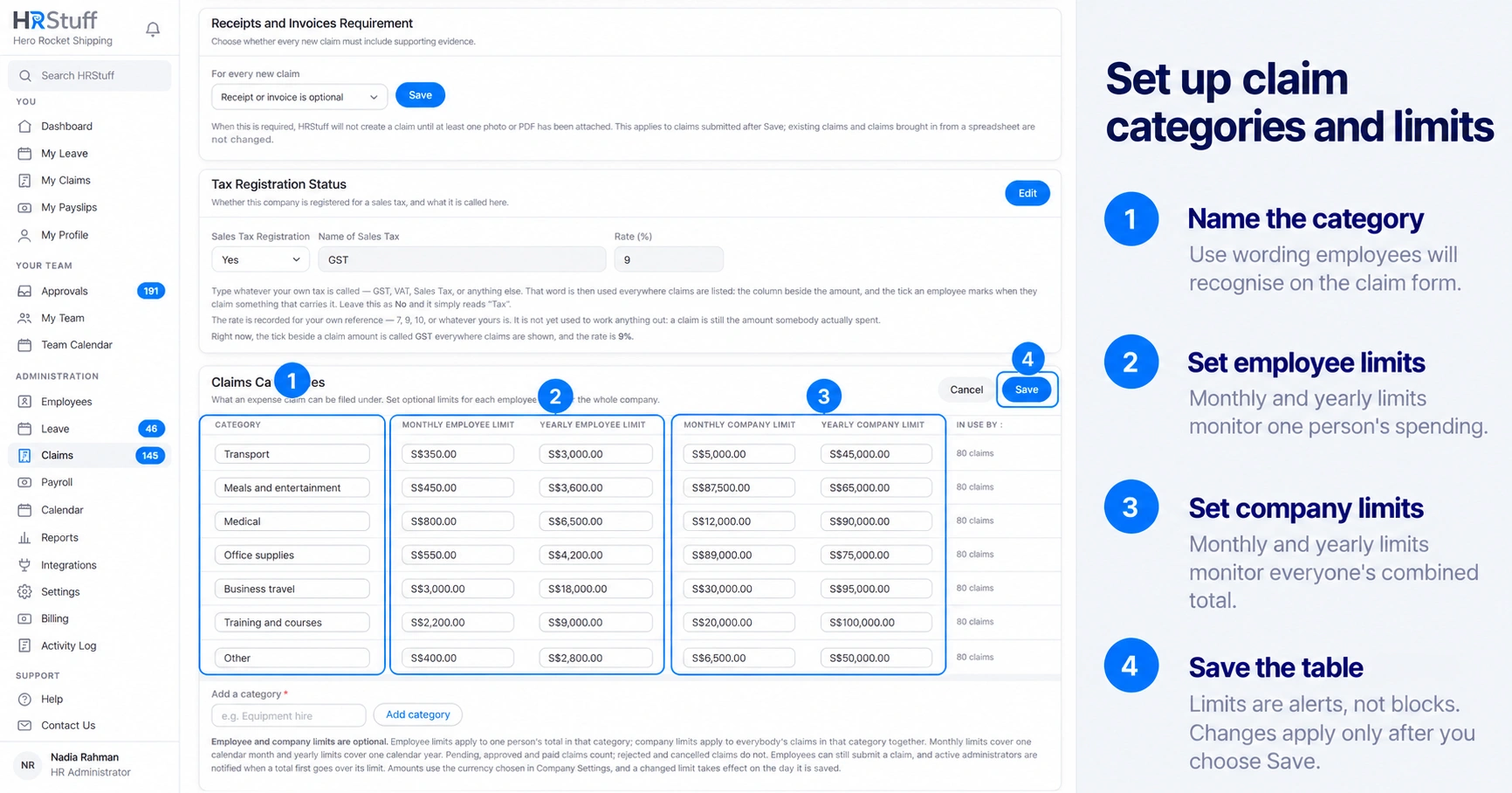
Choose the right kind of limit
Pending, Approved and Paid claims count toward these totals. Rejected and Cancelled claims do not. Amounts use the company currency. A new limit applies from the date it is saved; older claims keep the limit that applied when they were submitted.
Monthly Employee Limit watches one employee’s total in that category for one calendar month.
Yearly Employee Limit watches one employee’s total for one calendar year.
Monthly Company Limit watches everybody’s combined total in that category for one calendar month.
Yearly Company Limit watches everybody’s combined total for one calendar year.
Leave a field blank when that threshold does not apply.
Understand how limits can affect automatic approval
When Automatic Claims Approval uses employee limits, a claim is approved automatically only if it stays within both the monthly and yearly employee limits for its category. A blank employee limit means no limit for that period. Company limits only notify HR; they do not approve or reject a claim.
Require supporting evidence when needed
In Receipts and Invoices, choose whether every new manually submitted claim needs at least one receipt or invoice. The requirement applies after Save. It does not change existing claims or claims brought in through spreadsheet import.
Required means the claim is not created without an attachment.
Optional lets the employee submit without one; an approver can still reject an unsupported expense.
The rule confirms that a file exists, not that the file is readable or proves the expense. Approvers still need to check it.