
Use My Team
Review direct reports, team leave, claims and balances without opening private HR records.
What this guide helps you do
My Team is the manager’s working view of the people who report directly to them. It does not include the manager, indirect reports or the rest of the company.
The cards shown depend on the company features and the manager’s approval permissions. Open YOUR TEAM, then My Team.
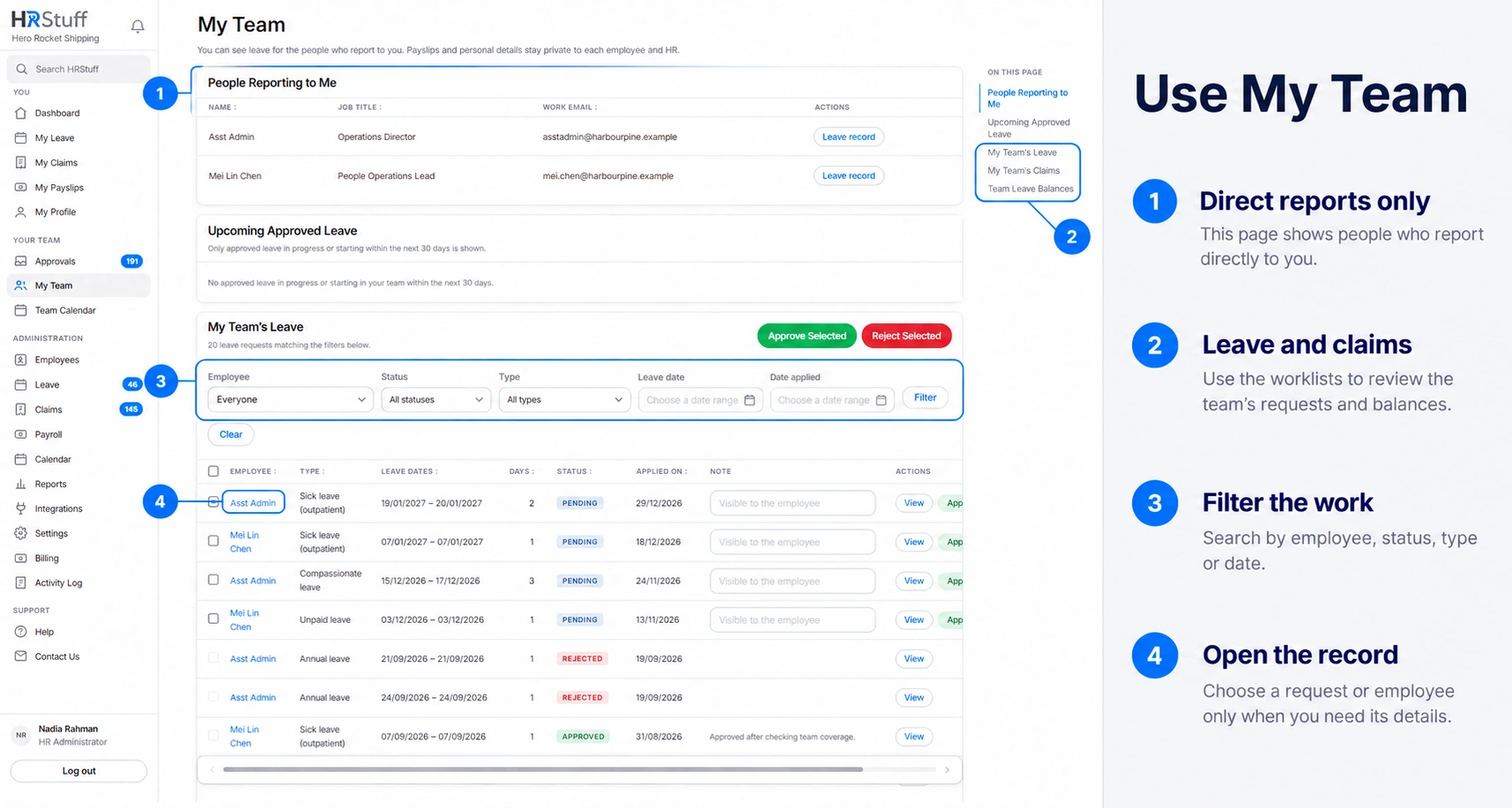
See who reports directly to you
People Reporting to Me lists each direct report’s name, job title and work email.
Choose Leave record beside a person to review their leave balances and request history for a selected leave year.
If somebody is missing or appears under the wrong manager, ask HR to correct the Reporting manager on the employee record. A login role does not create a reporting line.
Review team leave and claims
Upcoming Approved Leave shows approved absence already in progress or starting within the next 30 days. The full team tables keep the wider history.
My Team’s Leave includes pending, approved, rejected and cancelled requests. Filter by person, status, leave type, leave dates or date applied.
When Claims is enabled, My Team’s Claims includes direct-report claims. Search by name, description or category, filter by person, status or dates, and open permitted receipts from the list.
Use View when the table does not contain enough context. Approval and rejection buttons appear only for records you are currently allowed to decide.
Read Team Leave Balances
Choose the leave year on the card, then compare each direct report’s tracked leave types. The Used figure includes pending leave. The pending amount is also shown separately below the remaining balance, so you can see how much leave is still waiting for a decision.
Use row and selected-item actions safely
A leave approval note is optional and visible to the employee. A claim or leave rejection requires an employee-visible reason.
Select all covers eligible records on the current page, not every matching record on later pages.
Records you may view but may not decide have no decision buttons. If a record needs closer review, leave it unselected and open it separately.
Use the focused team pages
Approvals shows pending leave and claims currently routed to you for a decision.
Team Calendar shows approved and pending leave for you and your direct reports without exposing private leave reasons.
Team Reports provides the permitted People, Leave and Claims reports for current direct reports. It never adds pay, bank or private identity information.